Contents
Welcome Letter
Family Member Verification Annual Notice
2026 Benefits Programs
How Your Benefits Fit Together
Understanding Healthcare Terms and Plans
Postal Service Health Benefits (PSHB) Program
Initial PSHBS Account Setup Via Login.gov
Flexible Spending Accounts (FSA)
United States Postal Service Health Benefits Plan
CHECKBOOK Guide To PSHB Plans
Federal Employees Dental and Vision Insurance Program
Additional Benefits
Thrift Savings Plan (TSP)
Annual Leave Exchange (ALE) and Annual Leave Carryover Limits
Virtual Benefits Fair
Let’s Stay Connected
Welcome Letter
Dear Employees,
Open Season is here! This is your once-a-year opportunity to make changes to your Postal Service™ bene\uFB01ts. Open Season begins on November 10, 2025, and ends on December 8, 2025.
In this packet you will find:
n All the resources you need to help you navigate the changes and learn about your options for the 2026 benefits year.
n An explanation of various benefits-related terms.
n Quick reference guides for the Postal Service Health Benefits (PSHB) enrollment platform, flexible spending accounts, dental and vision plan options, and tools such as the CHECKBOOK’s Guide to PSHB Plans for USPS® Employees and Annuitants. The CHECKBOOK is a free online tool that allows you to compare available health, dental, and vision plans in your area to determine the best option for you and your family.
n Detailed information on the Virtual Benefits Fair and how to participate.
To help you understand how your benefits work together, the Benefits and Wellness Team will be hosting virtual educational presentations throughout Open Season.
You are encouraged to:
n Visit the Virtual Benefits Fair website (2025uspsopenseasonbenefits.vfairs.com) to view a schedule of live events, access plan provider booths, and listen to on-demand webinars.
n Attend a live Benefits 101 presentation, which is a comprehensive webinar that will review all of the exciting changes that are happening this Open Season.
n Get more information as follows:
n For links to PostalEASE® and the Postal Service Health Benefits System (PSHBS), CHECKBOOK’s Guide to PSHB Plans for USPS Employees and benefits webinar access, go to myhr.usps.gov/pay_benefits/benefits/open_ season_enrollment.
n For important updates throughout Open Season and beyond, text “BENEFITS” to 39369. Carrier SMS and data rates may apply.
Stay safe and healthy,
The USPS Benefits and Wellness Team
Family Member Verification Annual Notice
This annual notification from the United States Office of Personnel Management (OPM) and the Postal Service requires you to review eligibility rules and verify that your family members are eligible to be covered under your Postal Service Health Benefits (PSHB) plan.
Please carefully review the following eligibility information, which is also available in the FEHB Program Handbook under “Family Members” at opm.gov.
The Postal Service may request documentation of eligibility at any time. Documentation is required if you make a change to your PSHB enrollment outside of Open Season. It is your responsibility to verify that covered family members are eligible. You must work with the Human Resource Shared Services Center (HRSSC) or your PSHB carrier to remove any family members who become ineligible. In most cases, ineligible family members will not be removed automatically.
n Your current spouse.
n Children under the age of 26 are eligible for PSHB coverage if they are your:
n Biological children.
n Legally adopted children.
n Stepchildren.
n Foster children for whom you are the primary source of financial support and with whom you have a parent-child relationship. (You cannot add a foster child without approval from the Human Resource Shared Services Center.)
n Your former spouse once your divorce is finalized.
n Your children upon turning age 26 (unless determined to be incapable of self-support).
n Your parents.
n Grandchildren, unless they meet the requirements to be considered a foster child as determined by the Human Resource Shared Services Center.
n Domestic partners.
You must notify the Human Resource Shared Services Center within 60 days of a family member becoming ineligible at:
n 1-877-477-3273, select option 5; or
n 1-800-877-8339 (TTY).
The Human Resource Shared Services Center will inform your family member of their option to enroll in PSHB for themselves under temporary continuation of coverage or as a former spouse. In addition, you may also change your plan or enrollment type. You can find more detail about how to verify family member eligibility in the “Family Members” section of the FEHB Program Handbook at opm.gov.

2026 Benefits Programs
How Your Benefits Fit Together
Postal Service Health Benefits (PSHB) Comprehensive Medical Insurance
Dental and vision benefits may be included.
Health Care Flexible Spending Account (FSA)
You can set aside pretax dollars every year to pay for eligible health care services and products for you and your family that are not paid by your health, dental, or vision insurance.
Federal Employees Dental and Vision Insurance Program (FEDVIP)
Supplemental dental and vision insurance.
PSHB and FSA
Save money on eligible out-of-pocket expenses. When you have PSHB and FSA, you can use money in your FSA to pay your eligible PSHB out-of-pocket expenses such as copayments and coinsurance, qualified medical costs, and healthcare costs that your PSHB plan may not cover.
PSHB and FEDVIP
Lower your out-of-pocket costs on dental and vision expenses with FEDVIP coverage in addition to PSHB coverage. Your PSHB plan will be the first payer for any dental and vision benefit payments.
FEDVIP and FSAs
When you have an FEDVIP and an FSA, you can use money in your FSA to pay for your eligible FEDVIP out-of-pocket expenses such as copayments and coinsurance, and eligible expenses that your FEDVIP plan may not cover.
PSHB, FEDVIP, and FSA
Save money on eligible out-of-pocket medical, dental and vision expenses. You can use your FSA to pay for any eligible out-of-pocket expenses not covered by your PSHB and FEDVIP plan.
Understanding Healthcare Terms and Plans
Knowing common terminology can help you evaluate different types of health benefits plans:
n A provider is a physician, health care professional, or healthcare facility.
n A premium is the amount you pay for insurance.
n In-network treatment means receiving treatment from doctors, clinics, health centers, hospitals, medical practices, and other providers with whom your plan has an agreement.
n A deductible is the amount you pay before your plan begins to pay.
n Coinsurance is the percentage of the cost of services you pay once you’ve met your deductible.
n Copayment is the amount you pay up front for your visit.
n Allowed amount is the maximum amount on which payment is based for covered health care services.
n Out-of-pocket limit is the most you pay during a policy period before your health plan will pay 100 percent of allowed amount.
n Balance billing is when the provider bills you for the difference between the provider’s charge and the allowed amount.
PSHB Program plans offer you a choice of coverage with three enrollment types. You can choose Self Only coverage just for you, Self Plus One for you and one other eligible family member, or Self and Family coverage for you and two or more eligible dependents. The PSHB Program also provides you with the option of choosing from various types of plans, in the table below.
Postal Service Health Benefits (PSHB) Program
The PSHB Program is a separate program within the Federal Employees Health Benefits (FEHB) Program, which provides health insurance to eligible Postal Service employees, Postal Service annuitants, and their eligible family members.
Postal Service enrollees always have the right to choose their PSHB plan during the Federal Benefits Open Season. This year, Open Season will run from November 10, 2025, through December 8, 2025.
Accessing Your Account
Log in to your account with login.gov to view and compare plans and enroll. For additional help or questions, please call (833) 712-7742.
n To start, navigate to the PSHB enrollment site landing page by going to health-benefits.opm.gov/pshb.
n From the home page, select “Sign In,” which directs you to login.gov.
If you already have a login.gov account:
n Enter your credentials to “Sign In” and you will be taken to the authentication page. You will be prompted to upload identity documentation.
If you cannot remember the login information to your existing account:
n Follow the instructions to reset your password or register with a different email address.
To change your login.gov email address:
n Follow instructions at login.gov/help/manage-your-account/change-your-email-address.
n First-time users must select “Create an account” and follow the prompts.
Initial PSHBS Account Setup via Login.gov
n Set up an enrollee account with login.gov, view plans, compare, and enroll.
n For annuitants who require additional help or assistance, please refer them to the PSHB Help Line.
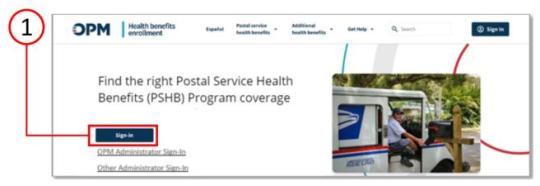
Step 1: Navigating to Enrollment Site and login.gov
n To start, navigate to the Postal Services Health Benefits (PSHB) enrollment site landing page by going to health-benefits.opm.gov/pshb.
n From the home page, select the “Sign-In” button which directs you to the login.gov site.
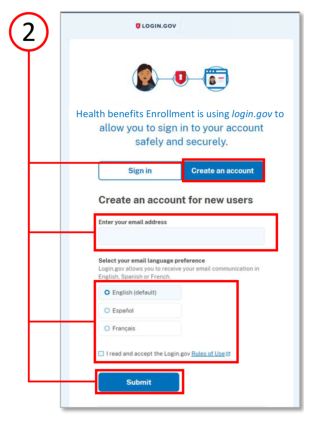
Step 2: Creating an Account
n Click the “Create an account” button.
n Enter your personal email address (one that you will always be able to access) and not your work email address. Select your preferred language.
n Read the Rules of Use and click the checkbox.
n Click the “Submit” button.
If you already have a login.gov account:
n Enter your credentials to “Sign In,” and you will be taken to the authentication page. You will be prompted to upload identity documentation, if you have not done so, as shown in steps 6-8.
If you cannot remember the login information to your existing account:
n Follow the instructions to reset password or register with a different email address.
To change your login.gov email address, follow instructions at login.gov/help/manage-your-account/change-your-email-address.
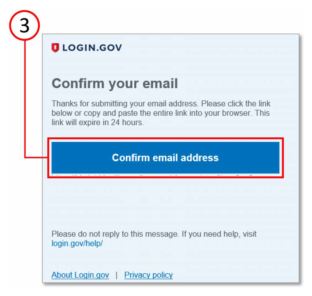
Step 3: Confirming Your Email Address
n Check your email for a message from login.gov.
n Click the “Confirm email address” button in the email message to confirm and be sent back to the login.gov site.
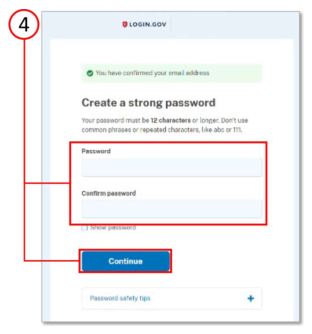
Step 4: Creating a Password
n Create your login.gov password.
Your password must have 12 or more characters and avoid combinations such as:
n Common phrases or repeated characters, like ABC or 111.
n Parts of your email address or personal dates, like your birthday.
n Click “Continue” button.
Note: Passwords will need to reach a strength threshold designated by login.gov.
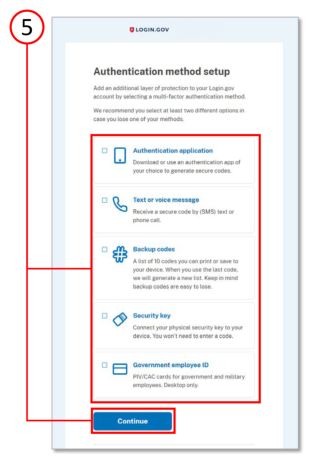
Step 5: Choosing an Authentication Option
n As an added layer of protection, login.gov requires you set up multi-factor authentication through the options listed.
n Learn more about each authentication option at login.gov/help/get-started/authentication-methods.
n Click the “Continue” button.
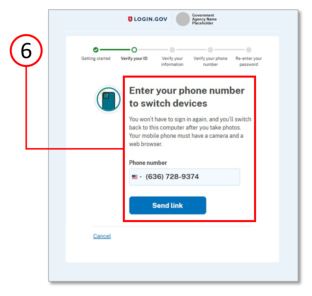
Step 6: Verifying Your ID
n Enter your phone number to switch from your computer to your mobile.
n Click the “Send link” button to start the process.
Note: Your mobile must have a camera and web browser to complete this process.
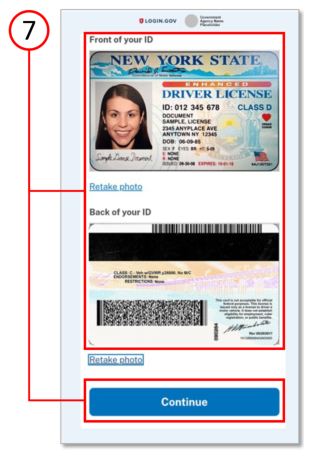
Step 7: Verifying Your ID, continued
n On your smartphone, you will add photos of your driver’s license or state ID card in a well-lit place, avoiding glares or shadows.
n Take a photo of the front of your ID, then the back of your ID, retaking if necessary.
n Click the “Continue” button.
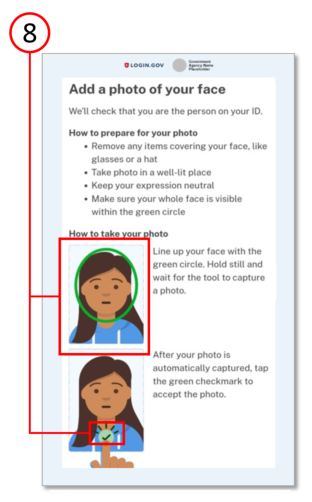
Step 8: Verifying Your ID, continued
n You will now be prompted to take a photo of your face. Select “Take Photo” and remove any items covering your face and take the photo in a well-lit area.
n Keeping a neutral expression, line up your face with the green circle and wait for the tool to capture a photo.
n Tap the green checkmark to accept the photo.
n On the next screen, you will be prompted to switch back to your computer to finish verifying your identity.
Note: If you are seeing the error messages “Allow access to your camera to take photos for login.gov” or “Your camera is blocked” while taking a photo of your face, please select the “Take Photo” button to continue.
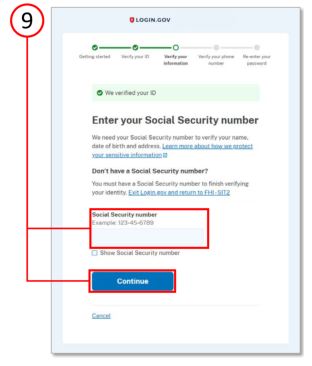
Step 9: Verifying Your Information
n Enter your full social security number in the field.
n Click the “Continue” button.
n On the next screen, verify all information you have entered is correct and update any incorrect information.
n Click the “Submit” button.
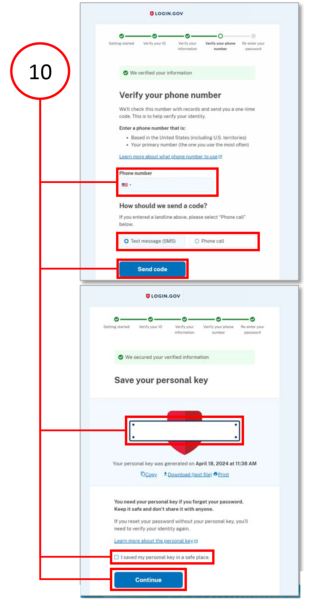
Step 10: Verifying Phone Number and Re-entering Password
n Enter your phone number.
n Select to receive a code via text or phone call; click the “Send code” button.
n Enter the one-time code; click the “Submit” button.
n Re-enter your password; click the “Continue” button.
n Save the personal key; check “I have saved my personal key in a safe place” box; click the “Continue” button.
n Click the “Agree and Continue” button to finish and be sent back to your Health Benefits Enrollment dashboard.
n For any additional assistance needed, contact the PSHB Helpline.
Flexible Spending Accounts (FSA)
Flexible Spending Account Program
You have flexibility in how you pay for your out-of- pocket expenses:
n Pay with an FSA debit card.
n Pay yourself back with funds from your FSA when you use cash, check, or personal credit card.
n Pay your provider directly from your account.
Smart spending for life’s expenses
When you contribute to an FSA, the money is deducted from your pay on a pretax basis. This means your contribution comes out of your paycheck before federal, Social Security and, in some cases, state taxes are deducted from your pay. Generally, federal taxes range from 15 percent to 28 percent. Social Security tax is currently 7.65 percent of your pay. So, you could save about 30 cents on every dollar you spend on eligible expenses.
For example, if an employee has an annual salary of $60,000 and they decide to contribute $2,500 to a health care flexible spending account (HCFSA) and $2,000 to a dependent care flexible spending account (DCFSA), they could save about $1,350 on health care spending with their pretax FSA contributions.
Let’s go over the basics
Your Inspira HCFSA lets you put pretax money aside for eligible health care expenses such as contact lenses, allergy, and pain relief medications, hearing aids and prescription eyeglasses. Your Inspira DCFSA also lets you use pretax money for eligible expenses to care for your loved ones such as day care or in-home care.
INSPIRA HCFSA: Fund your Inspira HCFSA by simply setting your election amount each year during Open Season. The contribution amount you choose is deducted evenly out of each paycheck throughout the year. Your HCFSA isn’t just for the big medical expenses, it’s also for the little things you might use every day. Eligible health care expenses include copays, coinsurance, deductibles, dental, and vision expenses, prescriptions, and over-the-counter health care supplies from select retailers. You may be surprised that things like sunscreen (SPF 30+) and contact solution are covered.
INSPIRA LPFSA: A limited-purpose flexible spending account (LPFSA) is similar to an HCFSA but is specifically for dental and vision expenses. Unlike the HCFSA, you can contribute to an LPFSA while being enrolled in a high-deductible health plan and having an HSA at the same time. You can use the LPFSA for things like prescription eyeglasses, contacts, dental visits, and orthodontia.
INSPIRA DCFSA: When an eligible family member needs care, but you still have to work, a dependent care account is a smart and convenient way to save, pay and budget for dependent care-related expenses. Funds can be used for your dependent(s) age 12 or younger, a spouse, or adult dependent(s) incapable of self-care.

How to enroll
n Go to liteblue.usps.gov, select “Sign In.”
n Enter your employee ID and enter your password.
n Verify your identity with a security method. Enter your security code.
n Select the flexible spending account icon from the LiteBlue® employee applications page.
n You will be redirected to the dedicated Inspira Financial page to complete your enrollment.
n The FSA enrollment application can also be accessed at myhr.usps.gov/pay_benefits/ benefits/flexible_spending_accounts/enrollment.
After You Enroll
Activate your debit card.
You will receive an Inspira debit card for the new plan year a few weeks after Open Season ends. When you use your Inspira debit card, your expenses are automatically paid from your reimbursement account. It is important that you save your receipts and Explanations of Benefits in case you need to validate a purchase.
Create your online account.
An online account is a fast and easy way to check your balance, pay yourself back, manage your account, and sign up for alerts. Setting up and accessing your account is easy:
n Go to liteblue.usps.gov, select “Sign In,” enter your employee ID and enter your password.
n Verify your identity with a security method. Enter your security code.
n Select the flexible spending account icon from the LiteBlue® employee applications page.
How to File a Claim
You can pay yourself back for eligible out-of-pocket health care expenses, or you can pay your health care provider directly from your online account as follows:
n After logging in through liteblue.usps.gov, click “File a claim” on the homepage, under “Account Actions.”
n Enter your claim details and select how you want to send documents to Inspira.
n You can complete a manual claim form on the FSA MyHR page to submit by mail or fax.
FSA Carryover
For 2025, the FSA carryover limit is $660. This allows you to carry over unused funds from your Health Care FSA into the next plan year. In order to carry over funds, you must enroll for the 2026 plan year.
The carryover feature allows you to avoid forfeiting unused funds.
To learn more about FSAs, go to myhr.usps.gov/pay_benefits/benefits/flexible_ spending_accounts.
If you have questions or need any help, you can contact Inspira Financial at 833-419-0305.
Customer service representatives are available Monday through Friday, 7 a.m. to 7 p.m. CT, and Saturday 9 a.m. to 2 p.m. CT.
*If you separate from employment during the benefit year due to resignation, separation or retirement, you will have 30 days from your separation date to submit claims.
For more information about FSAs and FSA educational materials, go to myhr.usps.gov/pay_benefits/benefits/flexible_spending_accounts.
United States Postal Service Health Benefits Plan
USPS Health Benefits Plan
The United States Postal Service is committed to providing quality health care options for precareer employees. CareFirst Blue Cross Blue Shield is the administrator of the USPS Health Benefits Plan.
n The USPS Health Benefits Plan is available to eligible precareer employees. If you are an assistant rural carrier or a holiday-term employee, you are not eligible for the plan.
n Each pay period, employees receive a Postal Service contribution toward their premiums. This reduces the cost that employees pay for their health coverage. You are eligible for the plan if you are a precareer employee. For rate information go to myhr.usps.gov/pay_benefits/benefits/usps_health_benefits/eligibility.
n You can enroll:
n During Open Season, November 10 – December 8.
n Within 60 days of hire.
n When you have a qualifying life event such as a marriage, divorce, death of a spouse or dependent, birth, adoption, or foster a child.
To enroll in the USPS Health Benefits Plan:
n Use PostalEASE® (ewss.usps.gov); or
n Call the Human Resource Shared Services Center (HRSSC) at 1-877-477-3273, option 1.
You may also contact the HRSSC for other benefits questions.
You can explore other health insurance options as a precareer employee. Visit CHECKBOOK’s Guide to PSHB Plans for USPS Employees and Annuitants through MyHR. You can compare plans and costs side by side for a full view of your health insurance options.
For more information, go to myhr.usps.gov/pay_benefits/benefits/usps_health_benefits.
For USPS Health Benefits Plan information regarding benefits, participating providers and other resources, go to carefirst.com/usps.
Federal Employees Dental and Vision Insurance Program (FEDVIP)
Eligible precareer employees can enroll in FEDVIP, which includes supplemental dental and vision benefits for self, self plus one, and self and family coverage.
To learn more and enroll, go to benefeds.gov.
CHECKBOOK Guide to PSHB Plans
CHECKBOOK’s online Guide to PSHB Plans for USPS Employees and Annuitants is available to all Postal Service employees and retirees at no cost.
CHECKBOOK will help you:
n See plans ranked by estimates of actual out-of- pocket costs.
n Compare basic levels of plans or get more detailed plan information.
n Evaluate FEDVIP plans available to you.
To find the right plan that meets your health care needs:
1. Go to myhr.usps.gov/pay_benefits/benefits/ open_season_enrollment or scan the code at right, then click.
n The link for Consumers’ CHECKBOOK: Guide to PSHB Plans for USPS Employees and Annuitants.
2. On the Open Season Enrollment page, scroll down to Checkbook Service link, then select:
n The ZIP Code™ where you will primarily be receiving health care services.
n Your enrollment category — bargaining, nonbargaining or precareer.
n The number of people in your family that you want to cover with your health insurance for 2026.
n Your age as of January 1, 2026.
n Whether you consider your health care costs to be low, average, or high. If you aren’t sure, select average.
3. Health care plans available to you are sorted:
n Automatically based on the yearly cost estimate (for families like yours).
n By most you could pay in a year or the annual published premium (the amount you pay out of your paycheck to be in the plan).
n Compare up to four plans by checking the box next to each plan and selecting “Compare.”
4. Identify the plan that’s best for you and your family. Write down the plan name and plan code. You will need this to make your Open Season election.
5. Enroll!
n Career employees must enroll through the Postal Service Health Benefits System (PSHBS) for PSHB.
n Eligible precareer employees must enroll in the USPS Health Benefits Plan through PostalEASE®.
Federal Employees Dental and Vision Insurance Program
Federal Employees Dental and Vision Insurance Program (FEDVIP) is a supplemental dental and vision insurance program for eligible federal employees and annuitants. BENEFEDS administers the program, which includes enrollment, plan changes and premium payment processes. FEDVIP offers self only, self plus one, and self and family plan options. To compare plans, go to benefeds.gov.
Enrolling in FEDVIP
You can enroll in FEDVIP every year during Open Season. This year Open Season begins November 10, and ends December 8. Outside of Open Season, if you experience a qualifying life event (QLE) such as a birth or adoption, marriage, divorce, or death of a family member, you can enroll within 60 days of the QLE. To enroll:
n Go to benefeds.gov; or
n Call 1-877-888-3337, TTY: 1-877-889-5680.
Additional Benefits
Commuter benefits
The Commuter Program allows you to pay for eligible commuting costs using pretax money, deducted from your paycheck. There is no fee to join or cancel.
There is no open enrollment period. You can enroll or make changes anytime throughout the year. For more information go to myhr.usps.gov/pay_benefits/benefits/ commuter_program.
University partnerships
The Postal Service has partnered with more than 50 universities. You can take advantage of deals that can help you grow personally and professionally. Some universities also extend a discount to employee family members. For more information go to myhr.usps.gov/pay_benefits/benefits/employee_deals/self_development_deals.
USPS Employee Assistance Program (EAP)
EAP offers you and your family free confidential support and services on a range of topics.
Through EAP, you can get help with issues such as problem solving, work life balance and leadership development. Go to myhr.usps.gov/pay_benefits/wellness/employee_assistance_program.
Employee deals
There are several deals offered to help employees enhance their lives while working at USPS. To take advantage of the great offers, go to myhr.usps.gov/ pay_benefits/benefits/employee_deals.

Thrift Savings Plan (TSP)
TSP is a retirement savings and investment plan and is the third part of the Federal Employees Retirement System (FERS). Your TSP will determine your quality of life in retirement. The Postal Service will match your contributions up to 5 percent. You can enroll through PostalEASE®. After enrolling, make your fund allocation through TSP. There are several fund options to invest in. If you are not stock savvy, the TSP Lifecyle Fund may be right for you. If you are not investing at least 5 percent, you are leaving money on the table. For more information about TSP, go to myhr.usps.gov/retirement/thrift_savings_plan.
Annual Leave Exchange (ALE) and Annual Leave Carryover Limits
The Annual Leave Exchange (ALE) carryover limits for 2026 are:
n 640 hours for career nonbargaining employees.
n Career bargaining employees must refer to their respective collective bargaining agreements.
The ALE program provides an option for eligible career employees to receive a lump sum payment in exchange for a portion of the annual leave that would otherwise be advanced at the beginning of the leave year.
n If you are eligible, you will receive an ALE eligibility notification letter in the mail. Please read your eligibility letter in its entirety. You may meet eligibility requirements when the letters are generated and lose eligibility if you do not continue to meet all requirements through the last day of the leave year.
n If you do not receive an eligibility letter and believe that you may be eligible, you can make an ALE request via PostalEASE®. Employees who make elections and do not meet ALE eligibility requirements as of the last day of the leave year will receive a notification that the payment will not be made.
n You will see your ALE payout in the first full pay period in 2026.
Note: ALE payments are considered supplemental wages by the IRS, and taxes will be withheld at a 22 percent rate. To receive a lump sum payment for Leave Year 2026, you must go to PostalEASE® during Open Season 2025 and make a request.
For more information, go to: myhr.usps.gov/en/pay_benefits/leave/annual_leave/annual_leave_exchange_program.
Virtual Benefits Fair
The Benefits and Wellness team will offer several opportunities to help you navigate Open Season. Please mark your calendars for the Open Season virtual benefits fair and Open Season 101 webinars. The fair provides an opportunity to visit health care provider booths, attend webinars and download informational materials on your personal computer or mobile device. The Open Season 101 webinars will include information on finding the best plan for your needs, how to use the Postal Service Health Benefits System (PSHBS) and PostalEASE® and inform you of benefit changes that will occur in 2026. The Open Season virtual benefits fair will address the following:
n PSHB Program carriers
n USPS Health Benefits Plan for Precareer Employees
n Retirement planning
n CHECKBOOK’s Guide to PSHB Plans for USPS Employees and Retirees
n Thrift Savings Plan (TSP)
n Flexible spending accounts
n Federal Employees Dental and Vision Insurance Program
n Medicare
n Social Security
n Employee Assistance Program (EAP)
n University school partnerships
n Employee deals
n Commuter Benefits
There will be live and on-demand presentations, live chats, and Q & A sessions with experts. Go to 2025uspsopenseasonbenefits.vfairs.com to register or scan the code at right.
You can access the website 24/7. All live sessions will be recorded and will be available for playback 1 hour after the session has ended. The Virtual Benefits Fair schedule is as follows:
Note: Participation is voluntary. Nonexempt employees may only participate off the clock or during authorized breaks.

Let’s Stay Connected
Sign up for short message service (SMS) text messaging today.
Text messages will include important information that you need as an employee related to benefits, wellness, financial education, and more.
Text 39369 for the updates you would like to receive:
n PSHBP — For updates on the PSHB Program.
n BENEFITS — For updates on benefits information.
n RETIREE — For annuitant-related information.
n PRECAREER — For updates on precareer benefits.
n SEMINAR — For retirement seminars.
If you opt in, you may incur the cost of using SMS text messaging (normal rates will apply).
— Benefits and Wellness,
Human Resources, 10-16-25