Contents
To Our Valued Employees
Family Member Verification Annual Notice
Eligible Family Members and Acceptable Documentation
Ineligible Family Members
2027 Benefits Programs
Understanding Healthcare Terms and Plans
Maximizing Your Benefits
How Your Benefits Work Together
Postal Service Health Benefits (PSHB)
Program
PSHB Integration with Medicare
Accessing Your PSHB Account
Initial PSHBS Account Setup via Login.gov
Login.gov FAQs
Checkbook Guide to PSHB Plans
Flexible Spending Accounts (FSA)
Federal Employees Dental and Vision
Insurance Program
Additional Benefits
Annual Leave Carryover
Virtual Benefits Fair
Let’s Stay Connected
To Our Valued Employees,
Open Season is officially here! This is your once-a-year opportunity to maximize your Postal Service™ benefits for the upcoming benefit year. You are encouraged to act quickly, because this critical window begins on November 9, 2026, and ends on December 14, 2026. It is essential to review your coverage every year, as plan benefits can change. Do not miss your chance to secure the best possible coverage for you and your family for 2027.
Beginning this Open Season, elections in which a family member is added must be verified before the enrollment can be finalized. If enrolling through Postal Service Health Benefits System (PSHBS), you will be required to upload proof of relationship documents through the portal. If you are enrolling via Standard Form 2809 (Health Benefits Election Form), you must include proof of relationship documents with your submission. To avoid delays in processing enrollments, submit the required documentation along with your enrollment changes. If the documentation is not received, your election will not be completed. More information on proof of relationship documents can be found below and at myhr.usps.gov/pay_benefits/benefits/postal_service_health_benefits under PSHB Tools.
This packet contains vital, time-sensitive resources designed to help you confidently navigate major changes and unlock your best plan options. Inside, you will find:
n Essential tools — All the resources you need to help understand your options and confidently manage 2027 benefit updates.
n Clear definitions — A comprehensive breakdown of key benefits-related terms so you can make informed decisions.
n Quick reference guides — Step-by-step instructions for the Postal Service Health Benefits (PSHB) enrollment platform, flexible spending accounts (FSAs), and dental and vision plan options.
n Checkbook’s Guide to PSHB Plans — Access to the free online comparison tool built specifically for USPS® employees and annuitants to evaluate local health, dental, and vision plans to determine the best option for you and your family.
n Virtual Benefits Fair details — Complete instructions on how to access and participate in this year’s live events.
To learn how your benefits work together, the Benefits and Wellness team is launching a series of virtual educational presentations throughout Open Season.
You are encouraged to:
n Explore the Virtual Benefits Fairs.
Go to 2026uspsopenseasonbenefits.vfairs.com to view the live events schedule, engage with plan provider booths, and stream on-demand webinars.
n Attend “Open Season 101.” Join the comprehensive, live webinar for a firsthand look at all the major changes and enhancements happening this Open Season.
You can access direct links to PostalEASE®, PSHBS, Checkbook’s Guide to PSHB Plans for USPS Employees, and benefits webinars at myhr.usps.gov/pay_benefits/benefits/open_season_enrollment.
Text “BENEFITS” to 39369 to receive real-time alerts throughout Open Season and beyond. (Carrier SMS and data rates may apply.)
Your choices dictate your coverage. Review these materials today, select your plan early, and ensure a secure, healthy 2027!
With commitment to your health,
The USPS Benefits and Wellness team
Family Member Verification Annual Notice
This annual notification from the U.S. Office of Personnel Management (OPM) and the Postal Service requires you to review eligibility rules and verify that your family members are eligible to be covered under your Postal Service Health Benefits (PSHB) plan.
Please carefully review the following eligibility information, which is also available in the FEHB Program Handbook under “Family Members” at opm.gov/healthcare-insurance/life-insurance/reference-materials.
Beginning this open season for plan year 2027, all federal agencies including the Postal Service must verify all open season elections in which a family member is added before the enrollment can be finalized. It is your responsibility to verify that covered family members are eligible and to work with the Human Resources Shared Services Center (HRSSC) or your PSHB carrier to remove any family members who become ineligible. In most cases, ineligible family members will not be removed automatically.

Eligible Family Members and Acceptable Documentation
The table below outlines eligible family members and the document(s) required to verify their PSHB program enrollment. You may remove personal financial information and Social Security numbers before submission. Documents that are not in English must be accompanied by a certified or notarized translation.
Eligible Family Member
|
Acceptable Documentation
|
Spouse
|
n If married less than 12 months: copy of government-issued marriage certificate.
n If married 12 months or more: copy of government-issued marriage certificate and one of the following sets of documents listing spouse: front page of most recent tax year’s Federal or State tax return; or proof of common residency (e.g., utility bill, other household bill, auto registration); and proof of financial interdependency (e.g., shared bank statement, credit card statement, life, or auto insurance policy).
|
Common law spouse
|
n A court order or judgment from the initiating state recognizing the marriage; or
n Your signed declaration. Documents for Common Law Marriage details what the declaration should include.
n You must also provide one of the following documents: that list you and your spouse:
n The first page of your most recent tax return that lists you and your common law spouse;
n Proof of common residency and proof of combined finances.
|
Child under age 26
|
A copy of one of the following documents that lists you and your child:
n Child’s official birth certificate;
n Certificate of live birth;
n The first page of your most recent tax return;
n Consular Report of Birth Abroad;
n Official paternity test;
n Voluntary affidavit of paternity or similar document; or
n Court or administrative order (e.g., a National Medical Support Notice).
|
Adopted child under age 26
|
A copy of one of the following documents that lists you and your child:
n Final adoption certificate or decree;
n Authorized letter from an adoption placement agency;
n The first page of your most recent tax return; or
n Court or administrative order (e.g., a National Medical Support Notice).
|
Stepchild child under age 26
|
A copy of one of the following documents:
n Birth certificate, or final adoption certificate/decree, listing current spouse as parent;
n Front page of most recent tax year’s federal or state tax return with child’s name; or
n Court or administrative order (e.g., National Medical Support Notice).
|
Foster child under age 26
|
All of the following documents:
n Child’s official birth certificate;
n Certification of foster child status; and
n Documentation that shows you provide regular and significant financial support for the child, such as:
n State or federal benefits programs listing the child as your dependent;
n The first page of your most recent tax return listing the child as your dependent; or
n Canceled checks, money orders, or receipts for periodic payments from you for or on behalf of your child.
If applicable, include a copy of the court order naming you or your spouse as the child’s legal guardian.
|
Child incapable of self-support
|
Medical certificate stating that the child is incapable of self-support because of a physical or mental disability that existed before they reached age 26 and is expected to continue for more than one year. See the FEHB Handbook at opm.gov/healthcare-insurance/healthcare/reference-materials/reference/family-members/#medcert for details about what the certification should include.
|
Ineligible Family Members
n Your former spouse once your divorce is finalized (even if your decree orders you to provide health insurance, your former spouse is not eligible to remain on your PSHB plan effective the date of divorce).
n Your children upon turning age 26, unless determined to be incapable of self-support. Contact the HRSSC for more information to avoid a lapse in Scoverage.
n Your parents.
n Grandchildren, unless they meet the requirements to be considered a foster child as determined by HRSSC.
n Domestic partners.
n Sibling(s), unless you have adopted and are caring for the sibling(s).
You must notify HRSSC within 60 days of a family member becoming ineligible at: 1-877-477-3273, select option 5; or 711 (TTY Telecommunications Relay Services).
HRSSC will inform your ineligible family members of their option to enroll in PSHB for themselves under temporary continuation of coverage or as a former spouse. You may also change your plan or enrollment type. You can find more details about how to verify family member eligibility in the “Family Members” section of the FEHB Program Handbook at opm.gov/healthcare-insurance/healthcare/reference-materials.
2027 Benefits Programs
Understanding Healthcare Terms and Plans

Knowing common terminology can help you evaluate different types of health benefits plans:
n Provider – a physician, healthcare professional or healthcare facility.
n Premium – the fixed amount that is deducted from your paycheck to pay for health insurance coverage.
n In-network treatment – doctors, hospitals and clinics that have signed contracts ith your insurance carrier to provide a prenegotiated, discounted rate. Your out-of-pocket costs, such as deductibles, copayments, and coinsurance, are lower and more predictable. Also, the doctor’s office handles all insurance paperwork and claims for you.
n Out-of-network treatment – these providers do not have a contract with your insurance carrier and set their own prices. You will typically pay the provider upfront and submit an itemized receipt to your insurance for partial (often 15–35 percent) reimbursement.
n Deductible – the specific dollar amount you must pay out-of-pocket for covered medical services before your health plan begins to pay.
n Coinsurance – the percentage of the cost of services you pay once you have met your annual deductible.
n Copayment – a fixed dollar amount you pay upfront at the time of your medical visit or service. This is also referred to as a copay.
n Allowed Amount – the maximum amount on which payment is based for covered health care services.
n Out-of-pocket limit – amount you will pay during a policy period before your health plan pays 100 percent of allowed amount.
n Balance billing – the practice of a provider billing you for the difference between the provider’s total charge and the health plan’s allowed amount.
n Explanation of Benefits (EOB) – a statement sent by your insurance plan provider detailing the services you received, how much was billed, how much your plan covered, and what you are responsible for paying.
n FSA grace period – an additional 2.5 months to use your Dependent Care Flexible Spending Account funds after the plan year officially ends.
n FSA run-out period – the designated period, January 1 – April 30, after the plan year ends when you can submit claims for reimbursement of eligible expenses incurred during that plan year. Important 2027 FSA Update: If you leave the organization or retire in 2027, you will now have 60 days from your departure date to submit receipts and claims for eligible FSA expenses. Please ensure all claims are submitted within this window to receive your reimbursement.
n Substantiated claim – an expense paid with your healthcare FSA that has been verified as eligible by providing proof that the funds were used strictly for qualified medical expenses under IRS guidelines.
n Unsubstantiated claim – an expense paid with your healthcare FSA that lacks the required documentation to prove it was an eligible medical expense.
Maximizing Your Benefits
The diagram below illustrates how your benefit programs work together to help maximize savings while minimizing your out-of-pocket expenses.
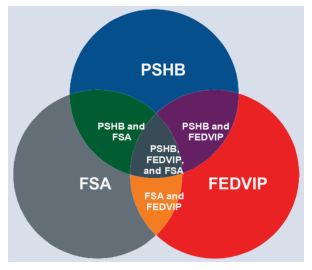
Postal Service Health Benefits (PSHB):
Comprehensive medical insurance coverage. Supplemental dental and vision benefits may be included depending on your specific plan selection.
Healthcare Flexible Spending Account (FSA):
Allows you to set aside pretax dollars annually to pay for eligible healthcare expenses not covered by your health, dental, or vision insurance.
n Information on Dependent Care FSA can be found on MyHR.
Federal Employees Dental and Vision Insurance Program (FEDVIP):
Supplemental, standalone dental, and vision insurance designed to enhance your primary coverage. You do not have to be enrolled in PSHB to be enrolled in FEDVIP.
How Your Benefits Work Together
n PSHB + FSA (medical savings): Reduce your out-of-pocket costs by using your tax-free FSA funds to pay for qualified expenses such as copayments and coinsurance, and eligible medical costs not covered by your PSHB plan.
n PSHB + FEDVIP (enhanced care): Lower your total dental and vision expenses by combining both plans. Your PSHB plan will automatically act as the primary payer, and your FEDVIP coverage will act as the secondary payer for remaining eligible costs.
n FEDVIP + FSAs (specialized savings): Use your FSA dollars to pay for eligible out-of-pocket expenses such as copayments and coinsurance, deductibles, or specialized treatments that your FED–VIP plan does not fully cover.
n PSHB + FEDVIP + FSA (comprehensive coverage and protection): Achieve the highest level of financial savings across all medical, dental, and vision needs. Your health and supplemental insurance plans pay first, and your FSA funds can be used to cover any remaining eligible out-of-pocket balances.
Postal Service Health Benefits (PSHB) Program
The Postal Service Health Benefits (PSHB) Program is a separate program within the Federal Employees Health Benefits (FEHB) Program. It provides comprehensive health insurance to eligible Postal Service employees and annuitants and their eligible family members.
Postal Service enrollees always maintain the right to choose their PSHB plan during the annual federal benefits open season. This year, open season is November 9, 2026, through December 14, 2026.
Plans under the PSHB Program offer coverage through three enrollment types:
n Self Only: Coverage exclusively for yourself.
n Self Plus One*: Coverage for you and one other eligible family member.
n Self and Family: Coverage for you and two or more eligible dependents.
The PSHB Program provides you with the option of choosing from various types of plans, as shown below:
Navigating Your Care: In-Network vs. Out-of-Network Benefits
Choosing a healthcare provider is a highly personal decision. To ensure you receive the highest quality of care without unexpected financial strain, it is important to understand how your healthcare options use provider networks. Depending on your personal preferences and medical needs, you can choose the provider that is right for you using either in-network or out-of-network care.
Sample of Insurance Paying In-Network vs. Out of Network
Here’s a simplified example to show how insurance payment and out-of-pocket costs differ between in-network and out-of-network care.
Scenario:
You have a plan with a $2,000 deductible, 20 percent coinsurance and a $100 copay for most services. The procedure costs $400, however the negotiated rate for in-network care is $250.

PSHB Integration with Medicare
As of January 1, 2025, Medicare Part B enrollment became mandatory for many Postal Service annuitants and their covered family members to maintain PSHB coverage into retirement. Failing to enroll in Part B when required can result in losing key PSHB benefits, including prescription drug coverage.
Medicare and PSHB Coverage for Employees
When to Apply for Medicare
Accessing Your PSHB Account
You are encouraged to review your PSHB plan every open season to check for significant changes. No action is required if your current carrier continues participation and you remain satisfied with your coverage. To modify your enrollment, access your online PSHB account as the initial step.
Log in to your PSHB account using Login.gov to view, compare, and enroll in available health plans. For additional assistance or questions, please contact HRSSC at 877-477-3273 or review the login.gov FAQ section below.
Step 1: Navigate to the portal
n Go to the Postal Service Health Benefits (PSHB) enrollment landing page at health-benefits.opm.gov/pshb.
n Select Sign In from the homepage to be redirected to Login.gov.
Step 2: Authentication and account setup
n Existing account users: Enter your credentials and sign in. You will be directed to an authentication page where you must verify your identity.
n First-time users: Select Create an account and follow the prompts to complete your initial PSHB account setup.
Account Management and Troubleshooting
n Forgotten credentials: Follow the on-screen prompts to reset your password or register using a different email address.
n Changing your email: Follow the step-by-step instructions provided at login.gov/help/manage-your-account/change-your-email-address.
Initial PSHBS Account Setup via Login.gov
Set up an enrollee account with Login.gov, view plans, compare, and enroll.
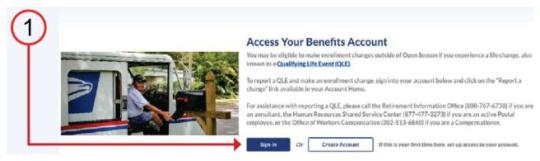
Step: 1: Navigating to Enrollment Site and login.gov
n To start, navigate to the Postal Services Health Benefits (PSHB) enrollment site landing page by going to health-benefits.opm.gov/pshb.
n From the home page, select the “Sign-In” button which directs you to the login.gov site.
Step 2: Creating an Account
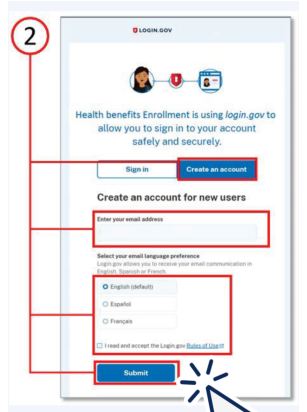
n Click the “Create an account” button.
n Enter your personal email address (one that you will always be able to access) and not your work email address. Select your preferred language.
n Read the Rules of Use and click the checkbox.
n Click the “Submit” button.
If you already have a login.gov account:
n Enter your credentials to “Sign In,” and you will be taken to the authentication page. You will be prompted to upload identity documentation, if you have not done so, as shown in steps 6-8.
If you cannot remember the login information to your existing account:
n Follow the instructions to reset password or register with a different email address.
To change your login.gov email address, follow instructions at login.gov/help/manage-youraccount/change-your-email-address.
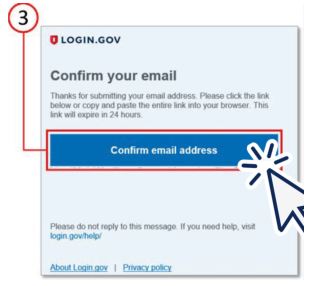
Step 3: Confirming Your Email Address
n Check your email for a message from login.gov.
n Click the “Confirm email address” button in the email message to confirm and be sent back to the login.gov site.
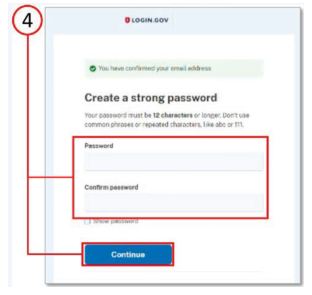
Step 4: Creating a Password
n Create your login.gov password.
n Your password must have 12 or more characters and avoid combinations such as:
n Common phrases or repeated characters, like ABC or 111.
n Parts of your email address or personal dates, like your birthday.
n Click “Continue” button.
Note: Passwords will need to reach a strength threshold designated by login.gov.
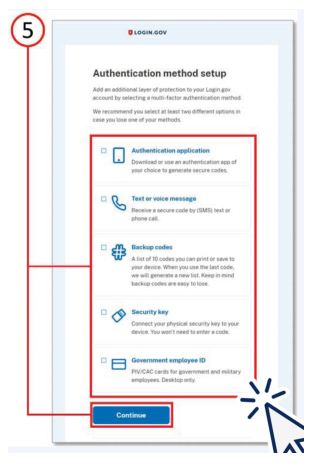
Step 5: Choosing an Authentication Option
n As an added layer of protection, Login. gov requires you set up multifactor authentication through the options listed.
n Learn more about each authentication option at login.gov/help/create-account/authentication-methods.
n Click the “Continue” button.
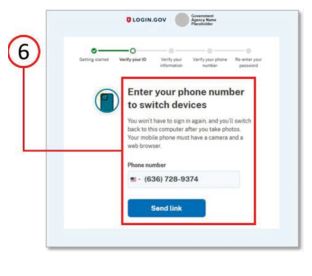
Step 6: Verifying Your ID
n Enter your phone number to switch from your computer to your
n Click the “Send link” button to start the process
n Note: Your mobile must have a camera and web browser to complete this process.
Step 7: Verifying Your ID, continued
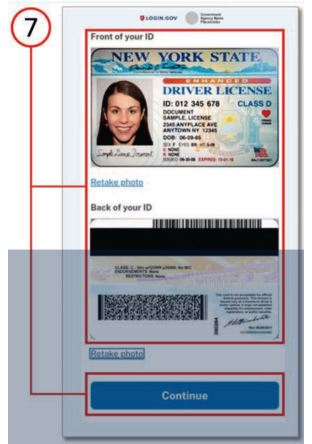
n On your smartphone, you will add photos of your driver’s license or state ID card in a well-lit place, avoiding glares or shadows.
n Take a photo of the front of your ID, then the back of your ID, retaking if necessary.
n Click the “Continue” button.
Step 8: Verifying Your ID, continued
n You will now be prompted to take a photo of your face. Select “Take Photo” and remove any items covering your face and take the photo in a well-lit area.
n Keeping a neutral expression, line up your face with the green circle and wait for the tool to capture a photo.
n Tap the green checkmark to accept the photo.
n On the next screen, you will be prompted to switch back to your computer to finish verifying your identity.
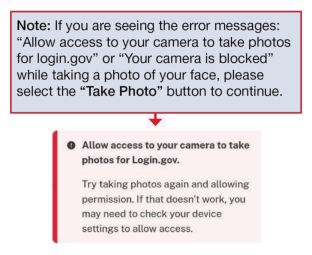
Note: If you are seeing the error messages “Allow access to your camera to take photos for login.gov” or “Your camera is blocked” while taking a photo of your face, please select the “Take Photo” button to continue.
Step 9: Verifying Your Information
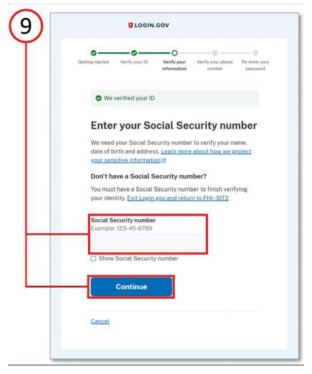
n Enter your full Social Security number in the field.
n Click the “Continue” button.
n On the next screen, verify all information you have entered is correct and update any incorrect information.
n Click the “Submit” button.
Step 10: Verifying Phone Number & Re-entering Password
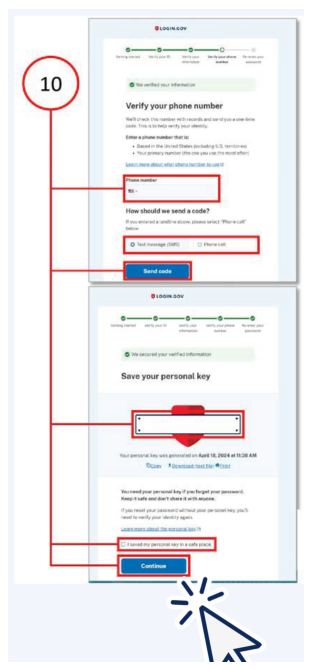
n Enter your phone number.
n Select to receive a code via text or phone call; Click the “Send code” button.
n Enter the one-time code; Click the “Submit” button.
n Re-enter your password; Click the “Continue” button.
n Save the personal key; Check “I have saved my personal key in a safe place” box; Click the “Continue” button.
n Click the “Agree and Continue” button to finish and be sent back to your Health Benefits Enrollment dashboard.
n For any additional assistance needed, contact the PSHB Helpline.
Login.gov FAQs
How can I update the email address for my Login.gov account?
If you are simply trying to update your email address, you must:
1. Go directly to secure.login.gov.
2. Sign in to the existing Login.gov account.
3. Update your email address within Login.gov.
I am unable to complete the identity verification by phone. What can I do?
Login.gov uses an automated verification process to validate phone numbers and not all phone numbers can be successfully verified.
Login.gov accepts:
n Cell or mobile numbers.
n Landline numbers.
Login.gov does not accept:
n International numbers and numbers in some U.S. territories.
n Google Voice or similar Voice over Internet Protocol (VoIP) numbers.
n Premium rate (toll) numbers.
n Most prepaid phone numbers.
If phone verification is unsuccessful, you may verify your identity by mail:
n Confirm that you want to request a letter to the address you verified previously.
n Re-enter your password to save the information you verified so far and send your letter.
n When you see a screen that your letter is on the way, you can sign out of login.gov and wait for your letter to arrive.
My email or password isn’t working.
What can I do?
If you don’t have access to the email you used to create your account and you do not remember your password, you need to create a new account with an email address you have access to and re-verify your personal information. To create a new account, use a different email address than you did when you created your first account.
Why is my account locked?

n You may have entered your password incorrectly too many times. Please wait 10 minutes and try again.
n If you’ve forgotten your password, please follow the password reset process.
n You may have requested too many security codes for the time period. Please wait 10 minutes and try again.
n You may have entered your security code too many times. Please wait 10 minutes and try again.
What can I do if my account was locked during identity verification?
Your account was locked because we limit the number of times that you can attempt to verify your ID, personal information or phone number online. This security precaution is in place in case someone else is trying to access login.gov using others’ personal information.
You’ll need to wait 6 hours before you can try to verify your identity again.
After six hours:
1. Go back to the partner agency website you were trying to access.
2. Sign in with your email address, password and authentication method. Do not create a new account.
3. You will be prompted to verify your identity again.
4. When you add photos of your ID, make sure that your name, address, and other information on your ID can be easily read before you submit it.
5. When you verify your personal information, check that all your information is correct on the confirmation screen. If your address or Social Security number are wrong, you can update that information before you submit it.
6. When you verify your phone number, check that your phone number is entered correctly and you are using an accepted type of phone number.
For additional information or assistance with login. gov, go to the Help Center at login.gov/help.
Checkbook Guide to PSHB Plans
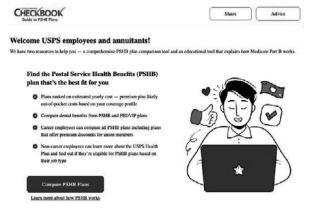
Consumers’ Checkbook online Guide to PSHB Plans for USPS Employees and Annuitants is available to all Postal Service employees and retirees at no cost.
Checkbook will help you:
n See plans ranked by estimates of actual out-of-pocket costs.
n Compare basic levels of plans or get more detailed plan information.
n Evaluate FEDVIP plans available to you.
To find the right plan that meets your health care needs:
1. Go to myhr.usps.gov/pay_benefits/benefits or scan the code at right, then click the link for Consumers’ Checkbook: Guide to PSHB Plans for USPS Employees and Annuitants.
Note: The complimentary version of this tool is only accessible when using the link or QR code at right.
2. On the open season enrollment page, scroll down to Checkbook Service link, then select:
The ZIP Code™ where you will primarily be receiving health care services.
n Your enrollment category: Career
n The number of people in your family who are eligible to cover with your health insurance for 2027.
n Your age on January 1, 2027.
n Whether you consider your healthcare costs to be low, average or high. If you aren’t sure, select average.
3. Healthcare plans available to you are sorted:
n Automatically based on the yearly cost estimate (for families like yours).
n By the most you could pay in a year or the annual published premium (the amount you pay out of your paycheck to be in the plan).
Compare up to four plans by checking the box next to each plan and selecting “Compare.” If you select more than four plans, the tool will not provide a comparison.
4. Identify the plan that’s best for you and your family. Write down the plan name and plan code. You will need this to make your open season election.
5. Enroll.
Once Login.gov and PSHB accounts are linked, eligible employees should enroll through the PSHB Systems portal.
Flexible Spending Accounts (FSA)
Turn everyday medical expenses into guaranteed tax savings with a flexible spending account, or FSA. By setting aside pretax dollars from your paycheck, you lower your taxable income and easily cover out-of-pocket costs for copays, prescriptions, and thousands of healthcare essentials. Inspira Financial is the current administrator for the USPS FSA program.
FSAs offer flexibility in managing and paying for your out-of-pocket expenses:
n FSA debit card: Pay for eligible expenses instantly at the point of sale.
n Direct reimbursement: Pay yourself back using account funds when you use cash, check, or personal credit or debit card.
n Direct provider payment: Issue payments directly to your healthcare provider from your online account.
Example: An employee with an annual salary of
$60,000 who contributes $2,500 to a Health Care FSA (HCFSA) and $2,000 to a Dependent Care FSA (DCFSA) could receive an estimated tax savings of $1,350 on their healthcare and family care spending.
Flexible Spending Account Options
Health Care FSA (HCFSA): Fund your account by selecting your annual election amount during open season. This total is deducted evenly from each paycheck throughout the year. Eligible expenses include copays, coinsurance, deductibles, prescriptions, dental care, vision care, and qualified over-the-counter supplies such as sunscreen with SPF 30+ and contact lens solution.
Limited Purpose FSA (LPFSA): If enrolled in a High-Deductible Health Plan (HDHP) with a Health Savings Account (HSA), you can only contribute to an LPFSA. LPFSA is designed specifically for dental and vision expenses only. Compatible plans are highlighted in Checkbook.
Dependent Care FSA (DCFSA): A tax-advantaged way to budget for care expenses while you work. Funds can be used for your dependents aged 13 or younger, a spouse, or an adult dependent incapable of self-care.

How to Enroll
1. Navigate to liteblue.usps.gov, select Sign In, enter your Employee ID and password.
2. Verify your identity using your designated multifactor authentication (MFA) security method and enter your security code.
3. Select the Flexible Spending Account icon from the LiteBlue® employee applications page.
4. Complete your enrollment on the redirected Inspira Financial page.
You can also access the application via the MyHR site at myhr.usps.gov/pay_benefits/benefits/flexible_spending_accounts.
Managing Your Account After Enrollment
1. Activate your debit card.
You will receive your Inspira debit card in the mail a few weeks after open season ends. Using this card automatically deducts eligible expenses from your FSA account. Always retain your receipts and Explanations of Benefits (EOBs) to validate your purchases if requested.
Note: Note: If you participated in an FSA during the previous year, the same debit card will be used in the new coverage year.
2. Create your online account.
An online account allows you to check balances, request reimbursements, and sign up for alerts. To log in:
n Go to liteblue.usps.gov, select “Sign In,” enter your employee ID and password.
n Verify your identity with a security method. Enter your security code.
n Select the FSA icon from the LiteBlue® employee applications page.
3. Download the mobile app
n Search for Inspira Mobile in the App Store or Google Play to download the free app.
n Log in using your account credentials and enable secure access (such as Face ID or a PIN).
How to File a Claim
You can pay yourself back or pay a provider directly through your mobile app or online portal:
n Log in via LiteBlue and click File a claim under the “Account Actions” section of the homepage.
n Enter your claim details and select your preferred method for submitting documentation.
n Alternatively, you may download a manual claim form from the MyHR FSA page to submit via mail or fax.
n Claims can be submitted via the mobile app.
FSA Carryover Rules
The FSA carryover limit is $680. This feature allows you to roll over $680 of unused funds from your 2026 Health Care FSA into the 2027 plan year, preventing forfeiture. To qualify for this carryover, you must actively enroll in an FSA for the 2027 plan year. FSA coverage is not renewed automatically. You must re-enroll each year to retain your benefits and carryover funds.
Contact and Support
For more information, go to the official resource page at myhr.usps.gov/pay_benefits/benefits/flexible_spending_accounts.
For specific questions or enrollment assistance, call Inspira Financial at 833-419-0305. Customer service representatives are available during the following hours (Central Time):
Monday - Friday, 7 a.m. to 7 p.m. CT,
Saturday 9 a.m. to 2 p.m. CT.
Federal Employees Dental and Vision Insurance Program
Eligible employees can enroll in Federal Employees Dental and Vision Insurance Program (FEDVIP) supplemental dental and vision benefits. The program offers three enrollment tiers: Self Only, Self Plus One, and Self and Family coverage.
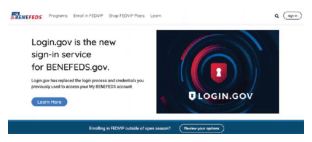
BENEFEDS administers the program, enrollment, plan changes, and premium payment processes. To review options and compare regional or national plans, go to benefeds.gov.
Enrolling in FEDVIP
Annual Open Season: You can enroll in or modify your FEDVIP coverage every year during the annual Federal Benefits Open Season. This year, open enrollment begins November 9, 2026, and ends December 14, 2026.
Qualifying Life Events (QLE): Outside of the standard Open Season window, you may enroll or make plan changes within 60 days of experiencing an eligible lifestyle change. Qualifying events include birth or adoption of a child, marriage, divorce or death of a family member.


Contact and Support
To learn more about your options or to complete your enrollment, use the official BENEFEDS contact channels:
n Online Portal: benefeds.gov
n Phone Support:1-877-888-3337
n TTY Services 1-877-889-5680
Additional Benefits
Commuter Benefits
The Commuter Benefits Program allows you to pay for eligible commuting costs using pretax dollars deducted directly from your paycheck.
n Flexibility: There is no fee to join or cancel, and there is no restricted open enrollment period.
n Enrollment: You can enroll or modify your contributions at any time throughout the year.
n Information: Go to myhr.usps.gov/pay_ benefits/benefits/commuter_program.
Enrollment into the Commuter Benefits Program must be completed by the 27th of the month and the funds will be available for use 2 months after enrollment (i.e., if you enroll by October 27, funds will be available for use on December 1, 2026).
University Partnerships
The Postal Service has partnered with more than 50 universities to support your personal and professional growth.
n Benefits: Take advantage of exclusive tuition reductions, educational deals, and specialized development programs.
n Family extension: Select university partners also extend these tuition discounts to eligible family members.
n Information: Go to myhr.usps.gov/pay_benefits/benefits/employee_deals/self_development_deals.
USPS Employee Assistance Program (EAP)
The Employee Assistance Program (EAP) offers you and your immediate family members free, confidential support and counseling services to navigate life’s challenges.
n Services: Receive professional guidance on problem-solving, work-life balance, stress management, mental wellness and leadership development.
n Information: Go to myhr.usps.gov/pay_benefits/wellness/employee_assistance_program.
Employee Deals
The Postal Service provides a wide variety of exclusive corporate discounts and marketplace deals to help employees save money.
Information: Go to myhr.usps.gov/pay_benefits/benefits/employee_deals.
Annual Leave Carryover
You can carry over some earned, unused annual leave (AL) from one year to the next. The amount is based on your employment classification.
n Carryover limit: 2027 AL carryover limits are:
n Nonbargaining career employees: Maximum carryover limit is 640 hours.
n Bargaining career employees: Please refer to your respective collective bargaining agreements (CBAs) for specific limits.
Excess earned annual leave must be used by the Friday before the first full pay period in the new year.
Annual Leave Exchange Program
The Annual Leave Exchange (ALE) program allows eligible career employees to receive a lump-sum payment in exchange for a portion of the annual leave that would otherwise be advanced at the beginning of the upcoming leave year.
n Eligibility notification: Eligible employees will receive an official ALE eligibility notification letter by mail. Please read this document in its entirety. Note that meeting the eligibility requirements when the letters are generated does not guarantee a payout; you must continue to meet all requirements through the last day of the current leave year.
n Manual requests: If you do not receive an eligibility letter but believe you qualify, you can submit an ALE request manually via PostalEASE®. Employees who make an election but fail to maintain eligibility through the final day of the leave year will receive a notification that the payment will not be issued.
n Payout timeline: Approved ALE payouts will be distributed during the first full pay period in 2027.
Tax Notice: The IRS classifies ALE payments as supplemental wages. Consequently, federal income taxes will be withheld at a flat 22 percent rate. These wages are also subject to all applicable state and local taxes.
To receive a lump-sum payment for leave year 2027, you must log in PostalEASE® during the 2026 open season window to submit your formal request.
For comprehensive details, visit the official page at myhr.usps.gov/en/pay_benefits/leave/annual_leave/annual_leave_exchange_program.
For more information, go to myhr.usps.gov/en/pay_benefits/leave/annual_leave/annual_leave_exchange_program.
Virtual Benefits Fair
The Benefits and Wellness team is hosting several interactive opportunities to help you navigate this open season. Please mark your calendars for both the Open Season Virtual Benefits Fair and the companion Open Season 101 webinars.
What to Expect
n Interactive platform: Access the virtual fair 24/7 on your personal computer or mobile device to visit healthcare provider booths, text with representatives, and download critical resource materials.
n Open Season 101 webinars: Attend these live sessions for step-by-step guidance on identifying the best plan for your family, using the Postal Service Health Benefits System (PSHBS) and PostalEASE®, and reviewing major benefit updates taking effect in 2027.
n Flexible playback: All live presentations and Q&A sessions with industry experts will be recorded and made available for on-demand playback one hour after the live broadcast ends.
Featured Programs and Booths
The Virtual Benefits Fair will feature dedicated resources and expert representation for the following areas:
n PSHB Program carriers.
n USPS Health Benefits Plan for pre-career employees.
n Retirement planning.
n Checkbook’s Guide to PSHB plans for USPS employees and retirees.
n Thrift Savings Plan (TSP).
n Flexible spending accounts.
n Federal Employees Dental and Vision Insurance Program.
n Medicare.
n Social Security.
n Employee Assistance Program (EAP).
n University school partnerships.
n Employee deals.
n Commuter benefits.
Registration Information
Go to 2026uspsopenseasonbenefits.vfairs.com to register for the events or scan the QR code. You can access the website 24/7. All live sessions will be recorded and will be available for playback one hour after the session has ended. The Virtual Benefits Fair schedule is as follows:
Let’s Stay Connected
Sign up for short message service (SMS) text messaging today.
Text messages will include important information that you need as an employee related to benefits, wellness, financial education, and more.
Text 39369 for the updates you would ike to receive: PSHBP for updates on the PSHB Program.
n BENEFITS for updates on benefits information.
n RETIREE for annuitant-related information.
n SEMINAR for retirement seminars.
If you opt in, you may incur the cost of using SMS text messaging (normal rates will apply).
Retirement Seminars
Planning for retirement starts with understanding your benefits and the Postal Service is here to help. Retirement seminars are available to guide employees through the process and provide the information needed to make confident decisions.
These sessions cover topics such as retirement eligibility, annuity calculations, health benefits and how to navigate the retirement process.
Whether you’re just beginning to plan or getting closer to retirement, attending a seminar can help you better understand your options and what to expect.
Seminars are held every Wednesday at 9 a.m. and 6 p.m. ET, making it easy to find a time that fits your schedule. The seminars are held via Zoom. Text “SEMINAR” to 39369* to receive a link sent directly to your phone. If you are unable to attend, the recordings and the seminar slide decks can be found at myhr.usps.gov/retirement/planning_ for_retirement.
*Standard rates apply.
— Benefits and Wellness,
Human Resources, 10-15-26



